 Tone matrix & beat sequencer

Light up squares to build looping melodies and beats, then arrange them into songs.
Tonegrid is a tone matrix for your browser: switch squares on and a playhead turns them into a looping melody, with a separate drum grid for the beat. Pick a key and scale so every note fits, shape the groove with tempo and swing, chain up to eight patterns into a song, and export WAV, MIDI, MP3 or a share link. Every sound is synthesized on your device and nothing plays until you press Play.
Screenshots
 Melody and drum grids with the sound panel
 Patterns chained into a song arrangement
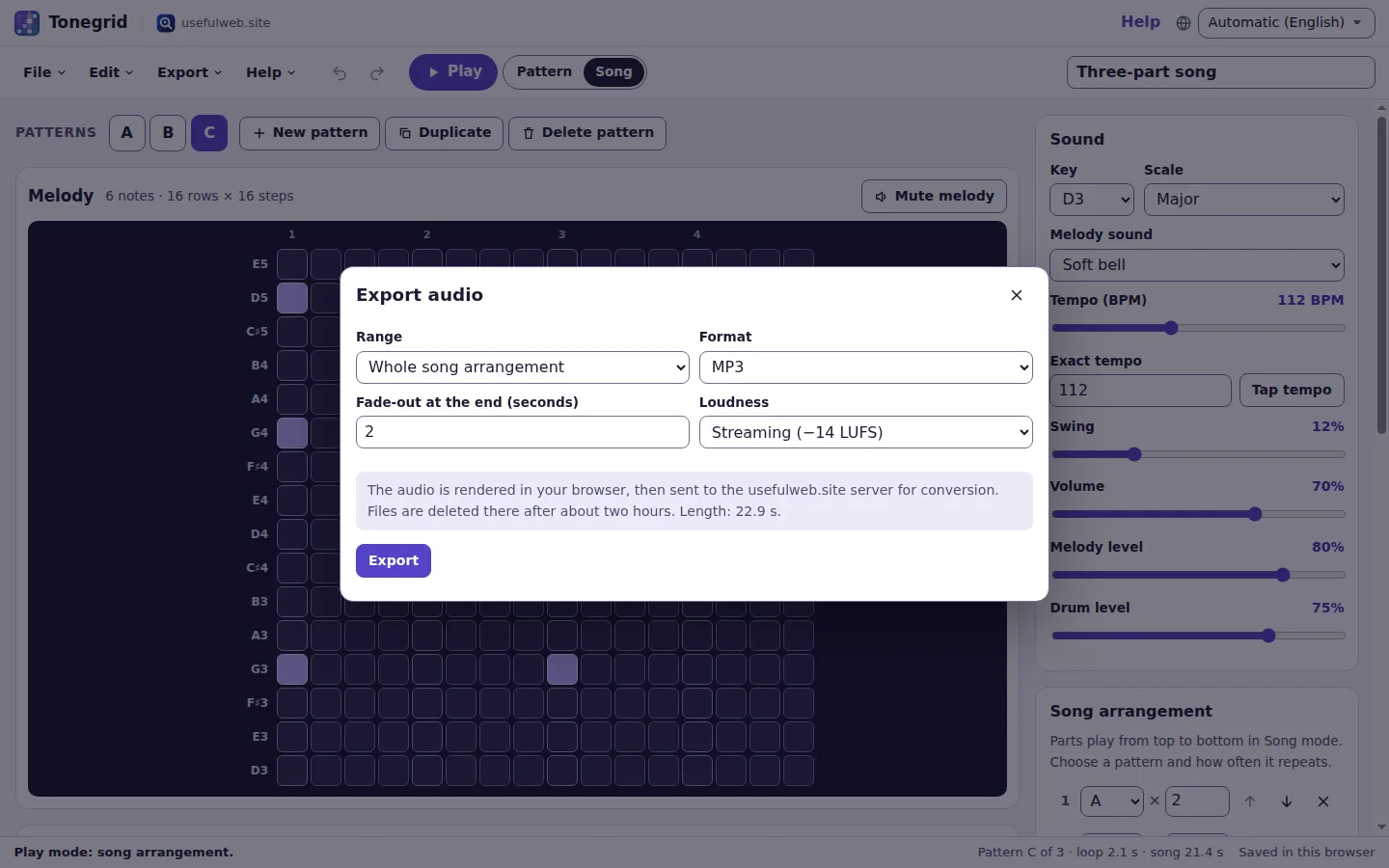 Export WAV in the browser or convert to MP3
 Dark theme while a pattern plays
 Works on phones and tablets
Features
Melody matrix
Light up 1–24 note rows across 1–32 steps. Squares in the same column ring together as chords; higher rows play higher pitches.
Separate drum grid
Up to eight synthesized drums — kick, snare, hi-hats, clap, tom, rim and shaker — on their own 1–32 step grid.
Keys and scales
Nine scales from pentatonic and blues to Dorian and harmonic minor, in any key from C3 to B4, so every square sounds right.
Tempo, swing and tap tempo
Set 40–220 BPM by slider, number or tapping, and add up to 45% swing for a shuffled groove — even while the loop plays.
Five synth voices and a mixer
Soft bell, pure sine, warm triangle, pluck or airy pad, with master volume, melody and drum levels and mute buttons.
Patterns A to H
Keep up to eight patterns in one project. Add, duplicate, copy and paste them, shift notes in time or move the melody up and down.
Song arrangement
Chain patterns into parts with 1–16 repeats each, reorder them and switch between Pattern and Song playback.
Polyrhythms built in
Melody and drums may have different lengths — 12 steps against 16 — and drift against each other until the full cycle lines up.
Seven templates
Start from lo-fi, arcade, shuffle blues, polyrhythm or a three-part song, or scatter a fresh random melody when you are stuck.
WAV, MIDI and MP3
Render a seamless WAV loop or the whole song in your browser, download a General MIDI file, or convert to MP3, Ogg, Opus, M4A or FLAC.
Release-ready audio
Optionally add a fade-out and match streaming loudness (−14 LUFS) with the site’s audio tools before you download.
Share links and files
Send a link that contains the whole project, save .tonegrid.json files, and hand rendered audio to other premium apps.
Autosave and undo
Projects autosave in this browser with a recent-projects list, full undo and redo, and optional Google Drive saving when signed in.
Playable by keyboard
Every square is a named button: arrow keys move, Space toggles. Shortcuts can be switched off and the playhead respects reduced motion.
Text patterns
Copy a pattern as readable x-and-dot text or paste one in — the same notation the Pattern Builder API understands.


Templates
Start from a ready-made project and change it to fit.
Ripples
A gentle pentatonic melody that rises and falls over a soft kick and hi-hat, in two patterns.
Lo-fi evening
Slow Dorian chords on an airy pad with a swung, laid-back beat.
Arcade run
Fast major arpeggios on the pluck voice over a four-on-the-floor beat.
Shuffle blues
A blues-scale riff with heavy swing and a call-and-response second pattern.
Phase garden
A twelve-step bell melody against a sixteen-step beat that drifts and realigns.
Three-part song
Intro, verse and chorus patterns already chained into a five-part song.
Blank canvas
Empty 16 × 16 melody grid and four drum rows.
Built-in tools
Tonegrid uses these tools. Each one also has its own page and works on its own, in the browser, through the JSON API and through MCP.
- Tonegrid Pattern Builder Tonegrid engineTurn x-and-dot step notation into a Tonegrid project and a MIDI file.
- Tonegrid Scale and Sequence Planner Tonegrid engineMap a scale to a note grid and plan your melody.
- Universal Audio ConverterConvert MP3, WAV, FLAC, Ogg, Opus, M4A and AIFF with bitrate and sample-rate control.
- Audio Cutter & MergerTrim audio, keep or remove ranges, fade in/out, or join up to 10 clips with crossfades.
- Audio Loudness NormalizerMeasure LUFS and true peak, then normalise to Spotify, podcast or EBU R 128 targets.
For AI agents
Tonegrid runs on a deterministic engine. The same functions are available as tools with a JSON API and MCP, so scripts and AI agents get exactly the results the app shows.
- Tonegrid Pattern Builder – Turn x-and-dot step notation into a Tonegrid project and a MIDI file.
Tool page ·POST https://tonegrid.usefulweb.app/api/v1/tools/tonegrid-pattern-builder/calculate· MCPtonegrid_pattern_builder - Tonegrid Scale and Sequence Planner – Map a scale to a note grid and plan your melody.
Tool page ·POST https://tonegrid.usefulweb.app/api/v1/tools/tonegrid-scale-planner/calculate· MCPtonegrid_scale_planner - Universal Audio Converter – Convert MP3, WAV, FLAC, Ogg, Opus, M4A and AIFF with bitrate and sample-rate control.
Tool page ·POST https://tonegrid.usefulweb.app/api/v1/tools/audio-converter/calculate· MCPaudio_converter - Audio Cutter & Merger – Trim audio, keep or remove ranges, fade in/out, or join up to 10 clips with crossfades.
Tool page ·POST https://tonegrid.usefulweb.app/api/v1/tools/audio-cutter-merger/calculate· MCPaudio_cutter_merger - Audio Loudness Normalizer – Measure LUFS and true peak, then normalise to Spotify, podcast or EBU R 128 targets.
Tool page ·POST https://tonegrid.usefulweb.app/api/v1/tools/audio-loudness-normalizer/calculate· MCPaudio_loudness_normalizer
- MCP endpoint (Streamable HTTP):
https://tonegrid.usefulweb.app/mcp - Project file format (JSON Schema): https://tonegrid.usefulweb.app/project.schema.json
- OpenAPI description: /openapi.json · llms.txt · API & MCP
Build a project through the API, then open it in the app with a link to https://tonegrid.usefulweb.app/app#project=<base64url JSON>.
Import & export
Import
- Tonegrid project (.tonegrid.json, versions 1–3)
- Share link (#project=)
- Text pattern (x-and-dot notation)
Export
- Tonegrid project (.tonegrid.json)
- WAV audio (pattern loop or song)
- MIDI file (.mid, General MIDI)
- MP3, Ogg Vorbis, Opus, M4A, FLAC (via site tools)
- Share link
- Text pattern
Keyboard shortcuts
| Keys | Action |
|---|---|
| P | Play or stop |
| 1 … 8 | Select pattern A to H |
| [ / ] | Shift the pattern one step earlier or later |
| Arrow keys | Move between squares in a grid |
| Space / Enter | Turn the focused square on or off |
| Home / End | First or last step of the row |
| Ctrl + Z | Undo |
| Ctrl + Shift + Z | Redo |
| Ctrl + S | Save project file |
| Ctrl + O | Open project file |
| ? | Show keyboard shortcuts (single-key shortcuts can be switched off there) |
Frequently asked questions
How do I make a melody?
Switch squares on in the melody grid and press Play (or P). Columns are steps in time from left to right, rows are notes from high to low, and squares in the same column play together as a chord.
Why does every combination sound good?
The rows follow the key and scale you choose. Pentatonic scales have no clashing half steps, so any squares fit together; switch to chromatic if you want every note.
Can I use Tonegrid with only a keyboard or a screen reader?
Yes. Each square is a button named with its note and step and announced as pressed or not pressed. Arrow keys move, Space or Enter toggles, and every menu and dialog works with the keyboard. Single-key shortcuts can be switched off in the shortcut list.
Will it start playing by itself?
No. Sound only starts when you press Play, and the optional note preview only sounds when you switch a square on. Nothing plays when a page, template or link opens.
What do melody and drum lengths that differ do?
Each grid loops at its own length, so 12 melody steps against 16 drum steps drift apart and line up again after 48 steps. WAV export of a pattern renders that full cycle.
Where are my projects stored?
In this browser (IndexedDB) on this device, listed under Recent projects. Save a .tonegrid.json file or a share link to keep or move a copy. Signed-in users can also save to their Google Drive.
Is anything uploaded?
Not for playing, saving, WAV or MIDI. Only when you choose MP3, Ogg, Opus, M4A, FLAC, a fade-out or loudness matching is the rendered audio sent to the usefulweb.site audio tools; those files are deleted after about two hours.
Can I use the music I make?
Yes. The sounds are synthesized by Tonegrid’s own code with no third-party samples, so the melodies and recordings you make are yours to use.
How does the MIDI file map the drums?
Melody notes are on MIDI channel 1 with a matching General MIDI instrument; drums are on channel 10 using General MIDI percussion keys, for example kick 36, snare 38 and closed hi-hat 42.
Limitations
What Tonegrid does not do (yet):
- Steps are sixteenth notes of equal length (plus swing); there are no note lengths, velocities per square, triplets or tempo changes within a song.
- All patterns in a project share the same grid sizes, key, scale and sound.
- Sounds are simple built-in synthesizers; you cannot load your own samples or plug-ins.
- WAV and other audio exports are limited to five minutes and 8,000 notes and drum hits; converting to compressed formats needs an internet connection.
- Playback timing depends on your browser and may pause or stutter while the tab is in the background or the device is busy.
- MIDI export contains notes only, not the Tonegrid sounds or mixer settings.
- There is no audio or MIDI recording from instruments and no live collaboration.
Tutorials
Learn Tonegrid step by step.
- Your first melody in five minutesLight up squares in the melody grid, press Play, and learn how rows, steps and chords work in Tonegrid.Beginner 5 min
- Add a beat with the drum gridProgram kick, snare and hi-hats on the separate drum grid, balance the mix and let different grid lengths create a polyrhythm.Beginner 6 min
- Keys, scales, tempo and soundsChoose a key and one of nine scales, set the tempo by slider, number or tapping, and pick one of five synth voices.Beginner 6 min
- Patterns and song arrangementKeep up to eight patterns, copy and vary them, then chain them into a song with repeats and switch between Pattern and Song playback.Intermediate 8 min
- Export WAV, MIDI and MP3, and share your musicRender a seamless WAV loop or the whole song, download a General MIDI file, convert to MP3 with a fade-out and streaming loudness, and share projects as files or links.Intermediate 7 min
- Play Tonegrid with the keyboardMove through the grids with arrow keys, toggle squares with Space, use shortcuts or switch them off, and adjust the playhead for reduced motion and screen readers.Beginner 5 min
- Text patterns and the Pattern Builder APICopy a pattern as x-and-dot text, paste text back into Tonegrid, and build projects and MIDI files through the JSON API or MCP.Advanced 8 min
Ready to try it?
Other premium apps
-

Kerfwise
Cabinet & furniture CAD
Design cabinets and furniture, get cut lists, optimised sheet layouts, costs and drawings.
-

Kinetica
Robot motion studio
Simulate robot arms in your browser: kinematics, trajectories, collisions, program export.
-

Threadsmith
Embroidery digitizing studio
Draw or import artwork, turn it into stitches, export DST, PES, JEF or EXP files.
-

Ohmforge
Virtual electronics workbench
Draw a circuit, switch it on, and measure it with real-feeling bench instruments.
-

Twinworks
Factory digital twin & production simulation
Model a production line, simulate it and find the bottleneck — free, in your browser.
-

Agentlab
AI-agent & LLM workbench
Test an AI agent before release: permissions, traces, costs, citations and output checks.
-

Bundlekeep
Local project backup
Back up projects from every usefulweb app into one file, check it and restore any part.
-

Chainscope
Web3 investigation desk
Investigate transactions, bridges, contracts, DAOs and wallets in one case file.
-

Chartroom
Data & charts studio
Import data, chart it, run analyses and publish a report — one workspace, free.
-

Fieldday
Sports club & training organiser
Fixtures, brackets, ratings and training plans for your club — in one workspace.
-

Flipline
Drawing, storyboards & animation
A few drawings. A little life. Make a flipbook in your browser.
-

Hearth
Home & travel planner
Plan meals, chores, home care, a move and trips for your whole household in one place.
-

Keysmith
Crypto & secrets lab
Audit certificates, keys, TLS and passwords in one lab; secrets stay on your device.
-

Ledgerly
Household finance & life-admin desk
Budgets, bills, subscriptions, loans, contracts and deadlines on one private desk.
-

Lumina
Photo editor & image toolkit
Bring out what you saw. A free photo studio, right in your browser.
-

OBSCURIQ
OSINT case desk
Organize public-source research: cases, a research log, pivots and indicators.
-

Opsdeck
Developer & ops workbench
One deck for CI failures, cron, traces, k8s events, API diffs, query plans and Terraform.
-

Pageboard
Website inspiration boards
Collect website references, sort them with tags and arrange them on a moodboard.
-

Panelcraft
Comic books & figure references
Shape a page. Arrange a book. Give your story a voice.
-

Paperwell
Document studio: PDFs, OCR, redaction, forms & contract reading
Your paperwork in one dossier: PDF tools, OCR, redaction, forms and contract reading.
-

Proofline
Math notebook
Solve, graph, test and visualise in one notebook — with data, findings and a report.
-

Provenance
Software supply-chain security desk
SBOMs, CVEs, containers and licences in one risk register — free, in your browser.
-

RavingDesk
Paper trading workspace
Practise trading on paper: orders, ledger, risk, exposure and journal. No real money.
-

Reelcraft
Audio, video & image batch studio
Audio, video & image batch studio: cut, convert, compress, subtitle, reframe
-

Renderloom
3D scene & material studio
Shape a scene. Find its light. Keep every idea editable.
-

Signalhouse
Website & internet infrastructure inspector
Inspect DNS, TLS, mail, CDN and routing of all your domains — and see what changed.